

Top 7 Large Screen Tablets in the USA — 2026 Picks
Published on Thursday, February 26, 2026
Large screen tablets deliver an expansive display for a truly immersive viewing experience, making them ideal for watching movies, playing games, creating art, or multi-tasking more effectively. In the United States, consumers increasingly want devices that balance portability with high performance, and larger tablets answer that need by combining roomy screens, powerful processors, long battery life, and stylus or keyboard support. These tablets serve both entertainment and productivity roles: streamers get brighter, more color-accurate displays; remote workers gain better split-screen and multitasking capability; and creative users enjoy more canvas area for drawing and design. With choices across iPadOS, Android, Windows, and Fire OS, shoppers can prioritize ecosystem, accessory support, and price to find the tablet that fits their unique workflow or leisure habits.
Top Picks Summary
Apple iPad Pro 13-inch M4 (2024)
The iPad Pro 13-inch M4 (2024) is the performance leader among large-screen tablets thanks to Apple’s M4 silicon, a premium mini‑LED/ProMotion display and a vast pro‑grade app ecosystem optimized for creative and productivity workflows. Its technical advantages — best raw CPU/GPU performance, tight hardware-software integration and extensive accessory support — justify a higher price compared with Android and budget alternatives while delivering the smoothest experience for demanding tablet-first work. For buyers who prioritize professional apps, color-critical displays and longevity, it outpaces the other entries on this list despite the premium cost.

Samsung Galaxy Tab S10 Ultra
The Galaxy Tab S10 Ultra stands out as the Android market leader for large-screen tablets with an expansive AMOLED display, included S Pen and Samsung DeX multitasking that approaches laptop-level productivity. It offers technical flexibility and customization that most Apple devices do not, and typically undercuts the iPad Pro on accessory pricing while matching or exceeding display quality for media and drawing workflows. Compared with midrange options on this list, the S10 Ultra balances flagship performance and stylus productivity without the Windows desktop compromises of hybrid devices.

Microsoft Surface Pro 11th Edition
The Surface Pro 11th Edition is the best choice when a true desktop-class Windows experience in a large tablet form factor is required, delivering full‑fat desktop apps, a built‑in kickstand and first‑party keyboard/pen accessories for hybrid workflows. Its technical advantage is running standard PC software that iPadOS and Android cannot natively match, making it the market leader for enterprise users and power users who need legacy Windows applications, though that comes with typically higher cost and shorter battery runtime versus ARM-based rivals. Against other tablets here it trades pure tablet fluidity for unparalleled compatibility with desktop ecosystems.

Lenovo Tab P12
The Tab P12 targets buyers who want a large‑screen tablet optimized for mixed media consumption and productivity at a competitive price, offering long battery life, solid display quality and optional pen/keyboard accessories for less money than flagship models. Its financial advantage is clear: you get many of the same large‑screen benefits (comfortably sized display, robust battery, accessory support) at a lower price point than the Apple and Samsung flagships, making it a strong value pick. While not the fastest device on this list, it’s a sensible compromise for budget-conscious users who still need a capable large tablet.

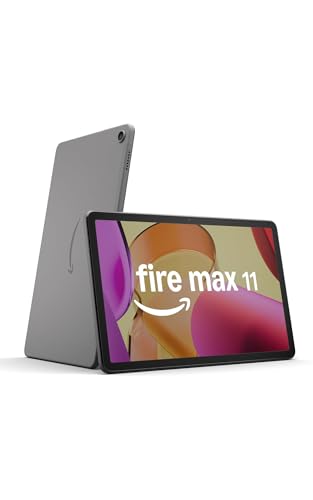
Amazon Fire Max 11
The Fire Max 11 is the best value large-screen tablet for media-first households, delivering an oversized display, solid battery life and deeply integrated Amazon services at a price markedly lower than flagship Android and iPad models. Its financial advantage is aggressive pricing and content ecosystem tie‑ins (Prime Video, Kindle, Alexa), though the technical tradeoffs include a trimmed app store and less powerful silicon, which makes it less suited for pro creative or multitasking use compared with the rest of the list. For streaming, reading and casual use on a large screen, it offers the lowest cost of ownership.
OnePlus Pad 2
The OnePlus Pad 2 delivers a compelling combination of a large bright display, fast charging and a clean software experience at a price that undercuts some premium flagships while offering near-flagship performance for gaming and media. Its technical strengths are a well-tuned Android skin and competitive hardware for the money, making it an attractive mid‑to‑high‑end alternative to Samsung and Apple for users who want strong value without entirely sacrificing performance. Compared with the budget and high-end tablets in this list, the OnePlus Pad 2 sits in the sweet spot for users seeking premium features at a lower premium.

$449 – $699
Samsung Galaxy Tab A9+
The Galaxy Tab A9+ is the large‑screen, budget‑minded Samsung option that prioritizes battery life, a comfortable viewing panel and family-friendly features at an affordable price. Technically it is less powerful than the Tab S10 Ultra and iPad Pro, but its financial advantage is clear for households or students needing a big display without flagship costs, and it still benefits from Samsung’s software polish and accessory ecosystem. For users who want a dependable large tablet for media, reading and light productivity, it represents a low-cost, low-risk choice among the options listed.

Why larger tablet displays help: research-backed benefits
Research from human factors, cognitive psychology, and ergonomics supports many practical advantages of larger screens. Bigger displays reduce the need for frequent scrolling and zooming, which can improve reading comprehension and task completion speed. They enable effective split-screen workflows, lowering cognitive switching costs when moving between apps. For creative tasks, larger active areas combined with responsive stylus input improve precision and user satisfaction. Ergonomic studies also show that using a larger tablet on a stand at a comfortable viewing height can reduce neck and shoulder strain compared with prolonged phone use. These findings explain why professionals, students, and media consumers often prefer large-screen tablets for mixed-use setups.
Larger displays reduce scrolling and visual search time, improving reading comprehension and productivity.
Split-screen and multi-window tasks on larger screens cut context switching, helping users complete workflows faster.
For drawing and design, greater active area plus low stylus latency improves accuracy and creative control.
Ergonomic use of a larger tablet with a stand can decrease neck and shoulder strain versus handheld use.
Display quality and color accuracy matter for media and creative work; higher brightness and wider color gamut improve viewing and editing results.
Frequently Asked Questions
Which large-screen tablet should I buy for creatives?
Choose the Apple iPad Pro 13-inch M4 (2024) if you’re focused on creative and productivity apps, since it uses the Apple M4 chip and a 13-inch Liquid Retina display with ProMotion; it’s rated 4.8 with a listing price of $1,002.83 USD
Does the Galaxy Tab S10 Ultra support HDR and S Pen?
Yes—the Samsung Galaxy Tab S10 Ultra includes an extra-large AMOLED display with HDR support and supports the S Pen for productivity and creative work; it’s rated 4.6 and costs $699.99 USD
Is the Surface Pro 11th Edition worth $869?
For $1,099.00 USDthe Microsoft Surface Pro 11th Edition provides a detachable keyboard with an adjustable kickstand plus full Windows support for x86 desktop apps, with an average rating of 4.3.
What’s different about Windows on the Surface Pro?
The Microsoft Surface Pro 11th Edition runs x86 desktop apps on full Windows, letting you use professional workflows in a large tablet form factor; it’s rated 4.3 and priced at $1,099.00 USD
Conclusion
This selection of large screen tablets covers a range of ecosystems and use cases so you can choose the right balance of display size, performance, accessories, and price. The models listed on this page are Apple iPad Pro 13-inch M4 (2024), Samsung Galaxy Tab S10 Ultra, Microsoft Surface Pro 11th Edition, Lenovo Tab P12, Amazon Fire Max 11, OnePlus Pad 2, and Samsung Galaxy Tab A9+. For most professionals and creators who want the best mix of display quality, performance, and accessory support, the Apple iPad Pro 13-inch M4 (2024) stands out as the top choice. I hope you found what you were looking for; you can refine or expand your search using the site search to compare specs, prices, or specific features like stylus support, cellular connectivity, or battery life.