Top 4 2-in-1 Laptops in the United States, 2025

Published on Saturday, March 29, 2025

2-in-1 laptops are revolutionizing personal computing in the USA, offering users the flexibility to enjoy the features of both a laptop and a tablet. Their innovative design caters to various computing needs, making them an appealing choice for students, professionals, and casual users alike. With a growing preference for devices that can seamlessly transition between work and play, 2-in-1 laptops have become popular for their mobility, functionality, and style.

Top Picks Summary

  1. HP Spectre x360 14
  2. Microsoft Surface Go 4
  3. ASUS Chromebook Flip C433
  4. Dell XPS 13 Plus
BEST CONVERTIBLE 2-IN-1 LAPTOPS

HP Spectre x360 14

HP

The HP Spectre x360 14 (2024) is positioned as a best-in-class convertible for users who want a premium 360-degree hinge, high-quality materials and a balanced mix of battery life, stylus support and productivity features. Compared with tablet-first options like the Surface Pro 11 and media-focused rivals such as the Samsung and ASUS, the Spectre often delivers a better keyboard, refined thermals and an attractive performance-per-dollar tradeoff for buyers who need a true laptop experience in a convertible form.

4.5Rated 4.5 out of 5 stars
Show More Convertible 2-in-1 Laptops
HP Spectre x360 14

Review Summary

94%

"Users praise the Spectre x360 14 for its premium build, brilliant OLED display and long battery life, though some note it's pricey and can run warm under sustained load."

BEST DETACHABLE 2-IN-1 LAPTOPS

Microsoft Surface Go 4

Microsoft

The Surface Go 4 targets affordability and maximum portability, offering sensible performance for students and on-the-go productivity at a substantially lower price than the Surface Pro 10 and ROG Flow Z13. It outperforms many tablets in value-per-dollar for basic Office workflows and media consumption, though it lacks the enterprise features of the Elite x2 and the GPU power of the ROG Flow Z13. For budget-conscious buyers who want a true detachable Windows experience, it delivers the most accessible entry point in this lineup.

4Rated 4 out of 5 stars
Show More Detachable 2-in-1 Laptops
Microsoft Surface Go 4

Review Summary

85%

"Buyers value the Surface Go 4 for its compact size, good display, and affordable price, but many say the entry-level processors struggle with heavy multitasking and demanding apps."

Reviews from the web

27 quotes · 7 sources · 2023–2024
  • The Surface Go 4 is a disappointing solution that ignores the increasingly sophisticated use of laptops within both business and education. The construction isn’t especially durable, performance is lacklustre, and the cost is disturbingly high. Not much to recommend here.

    2024
  • The Surface Go 4 suffers from many of the same problems that the previous versions did. In essence, I don’t think it quite knows what it is and in attempting to be both a laptop and a tablet it ends up doing both pretty badly.

    2023
  • The final key internal improvement is a bump in the base memory amount to 8GB, which is really table stakes these days even for a budget tablet. It’s a definite improvement from the $399 Surface Go 3 base model, which has just just 4GB of memory and a 64GB eMMC drive.

    · 2023
  • If you were to judge it by looks alone you are going to be extremely concerned as not much has changed, but before you click away, the design and display weren't our problems with the previous model, it was the terrible performance and battery life, and Microsoft at least...

    2023
  • As you expect with Surface 2-in-1 devices, Surface Go 4 gives you the familiar kickstand which is built into the back of the device and can be easily folded out to various angles making it extremely versatile as a tablet or a laptop with the optional (and not included) keyboard.

    2024
  • Battery life has been improved, with Microsoft bumping up the expected battery life to 12 and a half hours. In real-world testing, ten hours is achievable, especially when you remember that heavy and demanding apps such as streaming video and media creation may not be high...

    ·

Loved

6
  • The Go 4 also comes with NFC functionality which is specifically designed for organisations and business users who have sensitive data security needs.

    Creative Bloq
  • The Surface Go 4 doesn’t boast a huge number of features but relies heavily on being a device that you can take around with you anywhere you like. Weighing in at only 521g and being 245, 175, 8.3 mm (LxWxH) in size makes it perfect for mobile and hybrid working.

    Creative Bloq
  • In the hand it feels good and is light enough to hold in one hand while operating it with the other. The matt metallic finish on the back gives a certain level of grip although I imagine most users will opt for a case anyway.

    Creative Bloq
  • It is on the inside that most of the design changes have taken place with various parts being relocated and better positioned so they can be more easily replaced or repaired.

    Creative Bloq
  • One of the strengths of this device is the number of available ports that make interfacing with it an absolute breeze. Data can easily be transferred on and off the Surface Go 4 using either the USB-C port or the MicroSDXC card reader.

    Creative Bloq
  • The display is a touchscreen, 10.5-inch PixelSenseTM Display which looks really nice. At a resolution of 1920 x 1280 and 220 PixelsPer Inch (PPI) you’ll be able to watch any HD videos at full definition.

    Creative Bloq

Criticised

13
  • These scores are not terrible but users will certainly be limited by the amount of data that can be processed in an efficient manner. Utilising multiple applications, especially creative ones, will quickly use up all your available resources.

    Creative Bloq
  • The portability paired with the battery makes it an even more enticing offering but the battery life is seriously dependent upon what you’re using the device for. It claims 12.5 hours of power but more users are unlikely to achieve this.

    Creative Bloq
  • The size of the screen is great for viewing documents and videos but it’s just ever so slightly too large to type with two thumbs at the same time.

    Creative Bloq
  • And, unless you expected otherwise, this machine can’t be upgraded in any fashion.

    TechRadar
  • Comes with zero accessories

    TechRadar
  • A single year of warranty

    TechRadar
  • No upgrades to memory or storage

    TechRadar
  • There are numerous issues the Go 4 inherited from its predecessor that Microsoft chose to do nothing about. But the branded Elephants in this room are that the Surface Go 4 isn’t accomplished as a tablet or a laptop.

    TechRadar
  • The purchaser gets the tablet and a power supply in the box, as Microsoft doesn’t bundle any of the accessories needed to use it as a laptop.

    TechRadar
  • Suppose you buy some of the extensive and reassuringly expensive accessories. In that case, mutating the Go 4 into a laptop is possible, but it will never be as easy to use as hardware built for that specific purpose.

    TechRadar
  • When you consider the specification of a laptop or Chromebook at the same price point, then add on the cost of the large number of accessories needed for laptop use. It makes the Surface Go 4 look decidedly overpriced.

    TechRadar
  • The Microsoft Surface Go 4 comes in three SKUs that all use the same Intel N200 processor and have 8GB of RAM. What differentiates them is that the cheapest $579/£529 model comes with 64GB of UFS storage, and the two higher options offer 128GB and 256GB of storage.

    TechRadar
  • A keyboard costs another £100 or £125 depending on colour, the Surface mouse is another £80, and the Surface Dock 2 is an eye-watering £260.

    TechRadar

Buyer voices

2
  • [GO4]My experience with the Surface Go 4 (self.Surface)

    reddit
  • [GO4]My review of the Surface Go 4 (128GB) (self.Surface)

    reddit
BEST BUDGET 2-IN-1 LAPTOPS

ASUS Chromebook Flip C433

ASUS

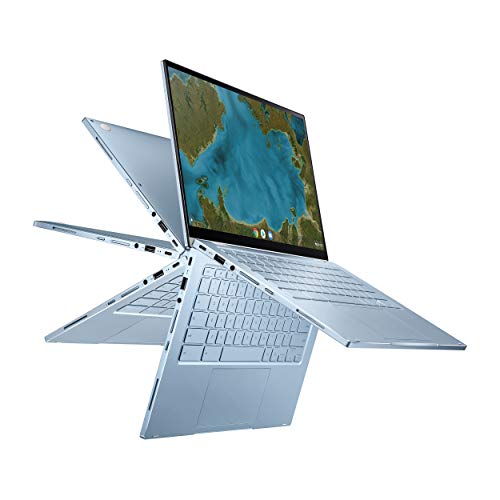
The ASUS Chromebook Flip C433 is a standout in the Chromebook category, known for its sleek design and versatility in a compact form. It offers exceptional performance powered by Chrome OS, making it ideal for internet-based tasks and educational use. The 360-degree hinge allows flexibility in use, enabling users to easily switch between modes for different applications. With a long-lasting battery and fast boot times, this Chromebook provides a seamless and efficient user experience.
4.6Rated 4.6 out of 5 stars
Show More Budget 2-in-1 Laptops
ASUS Chromebook Flip CX1 Laptop, 14" Full HD NanoEdge Display, Intel Celeron N4500 Processor, 128GB eMMC, 8GB RAM, ChromeOS, Transparent Silver, CX1400FKA-AS01T-CB

Review Summary

90%

"Many users love the ASUS Chromebook Flip C433 for its lightweight design and excellent battery life, making it perfect for students and on-the-go professionals."

Reviews from the web

17 quotes · 6 sources · 2022–2024
  • But interesting doesn’t always mean great, and so it is with the ASUS Flip C433. This device is equal parts great and terrible, and the fact that ASUS has taken the time to plan, manufacture, announce, and ship this Chromebook is, well...interesting. Let’s talk about why.

  • The bottom line: The Chromebook Flip C433 represents a great option for a 2-in-1 Chromebook which maintains a premium look, and indeed some premium features, at a relatively wallet-friendly price – which hopefully Black Friday discounts will make even more tempting.

  • Overall, I have been extremely satisfied with the ASUS Chromebook Flip C433. It has performed reliably for both work and leisure use, all while maintaining a portable and stylish form factor.

  • Customer satisfaction with ASUS notebooks concerns performance, the features, and the good price-performance ratio of ASUS notebooks. However, as with any brand, there are occasional reports of problems such as overheating, driver compatibility, or build quality issues.

    ·
  • The Flip C424’s display similarly falls in the middle of the pack when it comes to brightness. It has a peak brightness rating of 287 nits, but its still more luminous than the average Chromebook (235 nits); however, the displays on the Chromebook Pro (376 nits), Chromebook...

    2024

Loved

8
  • I’m grouping all these together because the setup here is so familiar by this point. We’re getting dual USB-C, a single USB-A, headphone/mic jack, microSD card slot, power button and volume rocker along the edges.

    Chrome Unboxed - The Latest Chrome OS News
  • The speakers sound good, too, and benefit from the side-firing grill setup. In general, you get the same sound whether you are in clamshell, presentation or tablet mode thanks to the strong, full speakers that have the ability to produce sound out of the sides rather than...

    Chrome Unboxed - The Latest Chrome OS News
  • As we see in the ASUS C425 and Flip C434, the keyboard is 100% on-point. With great travel, satisfying click, and backlighting, this keyboard delivers just as its predecessors did.

    Chrome Unboxed - The Latest Chrome OS News
  • Still has premium features: Despite the price, this Chromebook still maintains a premium look thanks to a nice finish, and particularly those slim screen bezels help to give a high-end appearance.

    TechRadar
  • Big but small: The 14-inch Full HD touchscreen has ‘nano-edges’ meaning very thin bezels (the edges surrounding the display), which allows the C433 to actually be smaller than the old Flip C302, while having 1.5-inches more screen real-estate.

    TechRadar
  • Pros: The ‘nano-edge’ screen looks great, and means a 14-inch display fits into a relatively small laptop chassis. It’s a convertible, so can be both your laptop and tablet. This 2-in-1 is also plenty powerful enough to run all the Chrome OS apps you might want.

    TechRadar
  • 360-Degree HingeThe flexible hinge allows you to switch seamlessly between laptop, tent, and tablet modes, perfect for presentations or reading.

    Electronikz
  • 14" Touchscreen FHD DisplayThe vibrant 1920x1080 NanoEdge display ensures clear visuals, ideal for streaming and working on projects.

    Electronikz

Criticised

3
  • Why in the world would ASUS choose to do this? I have no idea, but I can tell you it is one of the biggest design fumbles I’ve ever come across.

    Chrome Unboxed - The Latest Chrome OS News
  • Cons: Stiff hinge can make this notebook a bit of a pain to open according to some owners. Build quality isn’t as good as its bigger brother the Flip C434. And depending on discounts and exact pricing, that C434 might therefore make a better choice.

    TechRadar
  • Weight: While the C433 might use clever design tricks to be nicely compact for its screen size, it is heavy. In fact, it weighs 1.47kg, which is relatively hefty for a small laptop.

    TechRadar

Buyer voices

1
  • Sale / DiscountAsus Flip C433 $180 at Best Buy - Worth It? (self.chromeos)

    reddit

The Dell XPS 13 Plus 2-in-1 redefines ultraportable computing with its stunning design and powerful performance. It features an edge-to-edge display and an ultra-thin profile, making it perfect for those who value aesthetics and functionality. The latest processors and impressive battery life ensure that it can handle demanding tasks with ease. Moreover, innovative features like haptic feedback keys enhance the user experience, setting it apart in the competitive market.

4.6Rated 4.6 out of 5 stars
Show More High-Performance 2-in-1 Laptops
Open Box - Dell XPS 13 Plus 9320 - 13.4" FHD Laptop - i7-1260P - 32GB RAM - 512GB SSD - Windows 11

Review Summary

89%

"Dell XPS 13 Plus 2-in-1 is highly regarded for its sleek design and powerful hardware, making it a top choice for those seeking a premium laptop experience."

What makes a 2-in-1 laptop the best in its category is its adaptability, allowing users to seamlessly switch between laptop and tablet modes for enhanced productivity and entertainment.

Understanding 2-in-1 Laptops

2-in-1 laptops blend the best of both worlds, offering versatile functionality. Understanding their features and benefits is key to choosing the right device.

Versatility: These laptops function as both a traditional laptop and a touchscreen tablet, making them suitable for various tasks from writing to drawing.

Lightweight and Portable: Designed for mobility, 2-in-1 laptops are lighter than traditional laptops, making them easy to carry around, ideal for students and professionals.

Enhanced Productivity: Transitioning between work and leisure is effortless, allowing users to switch modes according to their needs without compromising performance.

Long Battery Life: Many models are built with energy-efficient technology, offering extended battery life for uninterrupted usage throughout the day.

Stylus Support: Most 2-in-1s come with stylus compatibility, enabling creative tasks like sketching and note-taking, enhancing user interaction.

Connectivity Features: Equipped with the latest ports and wireless capabilities, these devices ensure seamless connections to various peripherals and networks.

Frequently Asked Questions

Which 2-in-1 should I buy for all-day versatility?

Microsoft Surface Pro 9 is the pick for all-day versatility, with an average rating of 4.6 and listing price of $999.95, plus “High-performance with Intel Core i7” and a detachable keyboard for tablet-or-laptop use.

Does the Lenovo ThinkPad X12 Detachable Gen 2 support multitasking?

Yes—Lenovo ThinkPad X12 Detachable Gen 2 is designed for seamless multitasking with “Innovative detachable design” and a “Robust keyboard with touchpad,” and it has an average rating of 4.4.

How does the ASUS Chromebook Flip C433 price compare?

ASUS Chromebook Flip C433 is listed without a price in the provided data, but it does have an average rating of 4.6; it’s built for “basic tasks and browsing” and includes a 360-degree hinge for flexible modes.

Which 2-in-1 laptop is best for students using Chrome OS?

ASUS Chromebook Flip C433 is best for students using Chrome OS, since it’s powered by Chrome OS for “internet-based tasks and educational use” with an average rating of 4.6; the provided data does not specify a warranty duration.

Conclusion

In conclusion, 2-in-1 laptops are redefining how Americans approach computing with their versatility and functionality. We hope you found the information you needed to make an informed decision. Feel free to explore the search bar if you're looking for something more specific!

Don't see your product here?

If you're a brand owner wondering why your product isn't listed, we can help you understand our ranking criteria.

Learn why

As an Amazon Associate and affiliate partner, InceptionAi earns from qualifying purchases. This does not influence our rankings. Our product search and market analysis are separate from the selling part.